


SwimTopia
4.3187.00 Reviews
App Specs
- Version
- 7.2.0
- Updated On
- License
- Free
- Downloads
- 100,000+
- Developer
- Team Topia Inc.
- Categories
- Sports
- Platform
- Android
Screenshots

 Analysis by AppCompare
For a first-time user, the key thing to understand about SwimTopia is that its usefulness depends on your connection to a swim team. I found it most valuable as a shared place to keep up with team activity, rather than as a stand-alone swimming or workout app. If your team uses it, the first useful win is simple: find the right team and get the information you need for the next meet or event in one place.
Who will get the most from it
This sports app is aimed at the overlapping needs of coaches, swimmers, and parents. A coach may use it to coordinate team activity, while a parent is more likely to check schedules and follow meet information. Swimmers can use it to stay connected to their team and keep an eye on their own participation. That shared audience is a strength, but it also means the app can feel busy if you only need one small piece of information.
I would not choose it as a general fitness tracker, a way to learn swimming, or a replacement for a team that handles everything through another system. Its value is tied to whether your club or team is active on the platform. Before spending time setting up a profile, ask your coach or team contact which service they use and how members are expected to join. That one check can prevent the frustration of installing an app that does not connect to your team's routine.
What to expect from the first visit
The app is free to download, is rated for Everyone, and is developed by Team Topia Inc. It has a 4.8 average from more than 500 ratings, with over 50,000 installs. It first appeared in 2015, and version 7.2.0 requires Android 6.0 or later. Optional in-app purchases range from $1.99 to $14.99 per item, so I would check what a team actually needs before assuming every function is included at no cost.
That context matters because this is not simply a personal calendar with swimming-themed labels. The experience makes most sense when the team’s information and members are already organized around it. A new user may see options that are more useful to a coach or team administrator than to a parent checking a meet time. I recommend starting with your immediate task instead of trying to explore every area at once.
Getting from install to a useful result
Once you install it, begin by confirming how your team wants you to connect. If you are a parent or swimmer, use the team’s instructions rather than creating a separate setup based on guesswork. If you coach or administer a team, plan to organize the team details before asking everyone to join; a little coordination up front makes the experience clearer for families later.
Your first meaningful success could be finding the next team event and checking its details. For a parent, that is a practical test: can you locate the information you need without asking another family to resend it? For a swimmer, it might be confirming what is coming up. For a coach, the test is whether the team can use the app consistently enough that members know where to look when plans change.
Worth Reading Before You Choose

Flipboard Shows What News Apps Must Do Beyond the Feed

Switching to Android Auto Means Rethinking Your Driving Routine

Google Calendar Makes a Crowded Week Easier to Manage

Ludo King Makes the Most of the Minutes Between Plans

Baby Panda World Brings Quick Play to Modern Phones, but Its Game Library Feels Busy

ESPN’s Live Game View Makes Following Close Games Easier
A realistic use case is a busy weekday evening when a parent is arranging rides and checking the family calendar. Rather than searching old messages, the parent can open the team app, review the event information, and decide what needs to be added to the household schedule. I would still keep a backup note for anything time-critical until you know your team’s information is being maintained there reliably.
How it fits beside calendars and group chats
Compared with a general calendar, a swim-team app can keep team-specific information together instead of relying on someone to manually copy every detail into personal calendars. Compared with a group chat, it can offer a more orderly place to look for team updates rather than making members scroll through unrelated conversation. Those advantages depend on the team using the app consistently; a well-managed chat can be more useful than an empty or outdated team space.
I would treat calendar syncing as a convenience, not as a reason to stop checking team announcements. A calendar entry is helpful for remembering that an event exists, but a later change may require attention in the team’s own communication channel. A practical habit is to check the team information first when an event is approaching, then use your phone calendar for the personal reminder. This avoids assuming that every change will be reflected in every place automatically.
Getting Started with SwimTopia
The first thing I noticed when I downloaded SwimTopia was how clean and intuitive the interface is. Setting up my profile was a breeze. If you're a coach, you can jump right into creating a team, adding swimmers, and planning your first meet. For parents and swimmers, linking up with your team is just as straightforward. No tech wizardry required here!
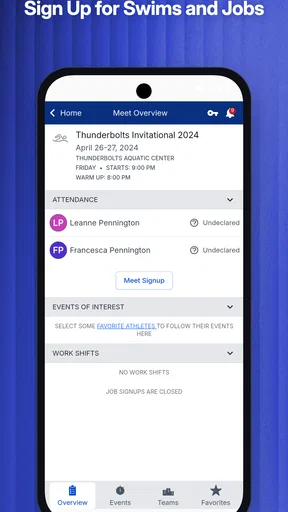
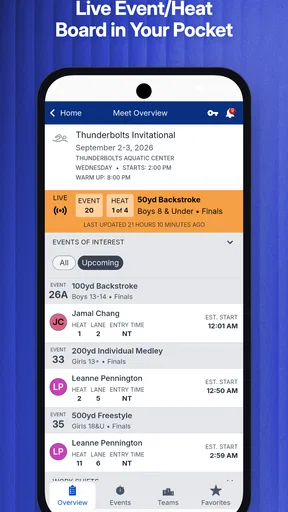
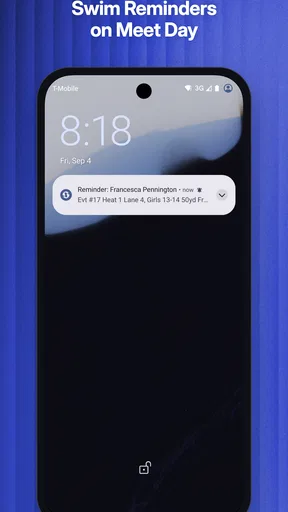
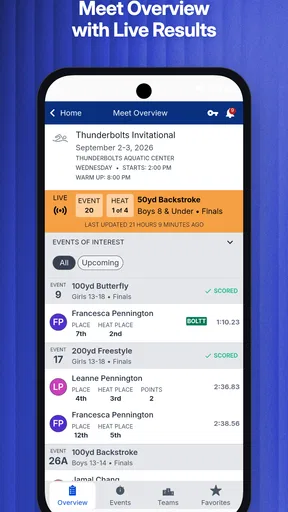
Once you're in, the dashboard provides a clear overview of all your upcoming events, which is super handy if you're juggling multiple meets. The app also sends notifications, so you’ll never miss a beat—or a heat!
Features That Make a Splash
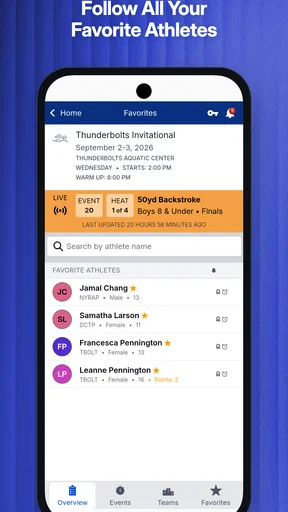
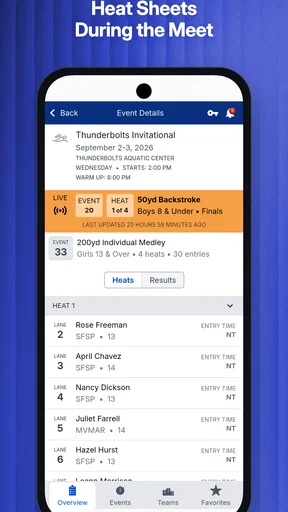
One of my favorite features is the meet management system. It allows coaches to easily set up events, track entries, and see the results in real-time. As a spectator, you can follow along with live updates, which is perfect for those of us who can't always be poolside.
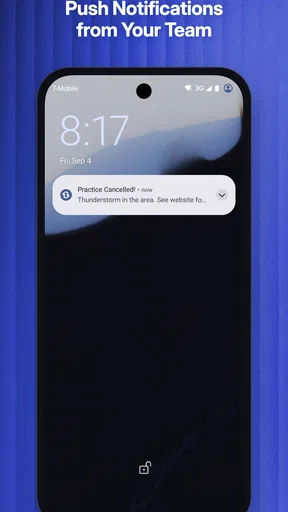
There's also a built-in communication tool. Coaches can send out messages to the whole team or individual swimmers, ensuring everyone stays in the loop. This is a lifesaver when last-minute changes pop up, and believe me, they always do!
SwimTopia also shines in the scheduling department. The calendar sync feature integrates seamlessly with your phone’s calendar, so you can see all your events in one place. No more double-booking disasters!
Dive Into the Community
Another aspect I love about SwimTopia is the community feel it fosters. The app isn't just about logistics; it’s about bringing people together. The social features allow teams to share photos, celebrate victories, and even organize carpooling. It’s like having a virtual swim club right in your pocket.
For those who geek out over stats (you know who you are!), the app provides detailed performance analytics. Swimmers can track their progress over time, which is a fantastic motivator. It’s like having a coach in your pocket, cheering you on!
Swimming Through Challenges
Of course, no app is perfect, and SwimTopia has its learning curve. Initially, navigating through the various features can feel a bit overwhelming, especially if you're new to swim management apps. But once you get the hang of it, you’ll wonder how you ever managed without it.
Another thing to keep in mind is that some features require a subscription, which might not be ideal for smaller teams with tight budgets. However, the value it provides in saving time and reducing stress is well worth it.
The Final Lap
All in all, SwimTopia is a robust tool for any swim team looking to streamline its operations and enhance communication. Whether you’re a coach, parent, or swimmer, this app caters to all needs, making the chaos of swim meets a little more manageable.
So, if you’re ready to dive into a more organized swim season, give SwimTopia a try. It might just be the lifeline your team needs!
A few habits that make it easier
For families with more than one swimmer, take a moment to check that you are following the right team information for each child. It is easy to assume that one profile or one calendar view covers every family member in the same way. Confirming who is connected to which team before relying on a schedule can save a last-minute call or a missed update.
Notifications are useful, but I would be selective about how I rely on them. If a message concerns a same-day change, open the team area and read the full update rather than trusting a brief alert preview. Alerts help bring information to your attention; they are not a substitute for understanding what changed, who it affects, and whether you need to respond.
Where the trade-offs show up
The biggest practical limitation is that a team tool works only as well as the team’s habits. If coaches post information in several places, or some families do not check the app, members can still end up comparing messages to work out which version is current. Agreeing on one place for schedules and one routine for urgent changes makes a bigger difference than learning every feature.
The range of roles also creates a trade-off. Coaches may appreciate having team coordination and meet tasks together, while a parent who only wants a date and time may find the broader set of options unnecessary. If your swim group has no shared presence in the app, a simple calendar invitation or the system your team already uses is likely the more sensible choice. I would not ask a small group to adopt a new tool unless the people responsible for updates are ready to maintain it.
For a new user wondering whether there is a cost, downloading the app is free, but some in-app purchases are available. I would ask the team which functions members need and whether the team expects families to pay for anything before relying on a particular feature. That is a more useful answer than assuming every user will encounter the same purchase prompt or need the same tools.
My recommendation is to start with one concrete task: connect to the right team, locate an upcoming event, and decide whether the information is clear enough to use. If that works, build the app into your meet-day routine gradually. For a team that keeps its information current, it can reduce the scramble between calendars, messages, and family plans; for someone outside an active SwimTopia team, it is unlikely to offer enough on its own.
Pros
- User-friendly interface for easy navigation.
- Customizable swim meet schedules.
- Real-time results tracking.
- Integrated communication tools.
- Support for multiple team management.
Cons
- Limited offline functionality.
- Occasional syncing issues reported.
- Some features require in-app purchases.
- Initial setup can be time-consuming.
- Limited customization for themes.
FAQs for SwimTopia
What features does SwimTopia offer for swim team management?
SwimTopia provides a comprehensive suite of features for swim team management, including meet entry management, team communication tools, volunteer coordination, and detailed reporting. It also offers a user-friendly interface for coaches, swimmers, and parents to access schedules, results, and team news. The app simplifies the organization and management of swim meets significantly.
Is SwimTopia suitable for both large and small swim teams?
Yes, SwimTopia is designed to accommodate swim teams of all sizes. Whether you manage a small community team or a large competitive league, the app offers scalable solutions that streamline operations. Its flexible tools can handle everything from scheduling and communication to results tracking, ensuring that teams of any size can benefit from its features.
How does SwimTopia handle communication within the team?
SwimTopia includes robust communication features that allow coaches and team managers to send messages directly to swimmers, parents, and volunteers. You can customize notifications for event reminders, practice changes, and important announcements. This ensures that all team members stay informed and connected, reducing the chances of miscommunication.
What kind of support does SwimTopia offer to its users?
SwimTopia provides extensive support through various channels, including a comprehensive help center with articles and tutorials. Users can also contact customer support via email or phone for personalized assistance. Additionally, SwimTopia offers webinars and training sessions to help users get the most out of the app’s features and functionalities.
Is there a mobile app available for SwimTopia?
Yes, SwimTopia offers a mobile app available on both Android and iOS platforms. The app allows users to manage swim meets on-the-go, access real-time event results, and communicate with team members. It’s designed to provide the same level of functionality and convenience as the desktop version, ensuring seamless access wherever you are.


